Smartphone security goes far beyond setting a basic lock screen pattern or PIN. With sensitive personal data, financial accounts, and private conversations stored across daily apps like WhatsApp, Mobile Banking, Gallery, and Social Media platforms, applying a secondary layer of biometric protection is crucial. An AppLock Fingerprint APK empowers users to secure individual applications using their phone’s built-in fingerprint scanner, PIN, or pattern unlock.
This comprehensive guide covers everything you need to know about AppLock Fingerprint apps, including standout features, technical specifications, step-by-step setup instructions, and essential security practices for Android.
What is AppLock Fingerprint?
An AppLock Fingerprint tool is an utility application built specifically for Android devices. Instead of relying solely on your phone’s primary lock screen, AppLock operates continuously in the background to launch a biometric authentication prompt the moment a protected app is accessed.
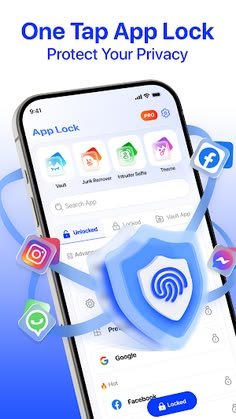
By leveraging Android’s native Biometric API alongside system overlay permissions, AppLock secures individual applications without modifying core system files or requiring root access on your hardware.
Key Features of AppLock Fingerprint Apps
Modern AppLock tools combine lightweight performance with robust security features. Here are the core capabilities:
1. Instant Biometric & PIN Unlocking
Lock sensitive apps using your smartphone’s registered fingerprint scanner for fast, single-touch access. Backup options—such as a custom PIN or pattern lock—ensure you never lose access if the sensor is smudged.
2. Encrypted Photo & Video Vault
Hide private gallery photos and personal videos inside an isolated, encrypted vault. Media moved to the vault is automatically hidden from default gallery apps and file managers, making it accessible only through the AppLock interface.
3. Intruder Selfie Capture
If an unauthorized user attempts to open a protected app and inputs an incorrect password or fingerprint multiple times, AppLock secretly captures a photo using the front camera and records the exact timestamp.
4. Icon Disguise & Stealth Mode
Camouflage the AppLock launcher icon as a regular utility app—such as a Calculator, Compass, or Weather widget—to hide the presence of security software from snoopers.
5. Uninstall & System Protection
Activate administrative uninstall protection inside the settings menu to prevent unauthorized users, friends, or kids from uninstalling AppLock to bypass password restrictions.
Pros and Cons of AppLock Fingerprint
Evaluating both advantages and operational considerations helps ensure a smooth setup:
Pros:
- Granular Application Control: Protect specific apps individually rather than locking down your entire phone.
- Fast Biometric Access: Instant unlocking using physical or in-display fingerprint sensors.
- Privacy Enhancement: Built-in photo/video vaults keep personal media secure.
- Lightweight & Free: Minimal RAM consumption and fast execution across budget and flagship devices.
Cons:
- Background Permissions Required: Requires granting “Display Over Other Apps” and “Usage Access” permissions to function properly.
- Sensor Cleaning Needed: Dirty or wet fingerprint sensors can occasionally fail recognition, requiring PIN fallback.
Technical Specifications
| Specification | Details |
| App Name | AppLock Fingerprint |
| Category | Security & Privacy Utilities |
| Supported OS | Android 6.0 (Marshmallow) and higher |
| Authentication | Fingerprint, PIN Code, Pattern Lock |
| Permissions Required | Display Over Other Apps, Usage Stats Access |
| File Size | ~10 MB to 20 MB (Lightweight) |
| License | Free |
Step-by-Step Installation & Setup Guide
Configuring AppLock Fingerprint requires granting key system permissions so the security overlay triggers seamlessly over protected apps.
1.Download the Application Package:Download.
Download the official AppLock app from the Google Play Store or get the verified .apk package file from a trusted software repository.
2.Set Up PIN or Pattern Lock:Master Password.
Launch the app for the first time and configure a primary PIN code or master pattern password. Enter a recovery email address in case you ever forget your credentials.
3.Grant Required System Permissions:System Setup.
Grant the required Usage Access and Display Over Other Apps (Overlay) permissions when prompted so AppLock can detect app launches and display the lock screen instantly.
4.Enable Fingerprint Authentication:Biometrics.
Navigate to AppLock’s internal settings menu and toggle on Use Fingerprint Unlock. Ensure at least one fingerprint is already enrolled in your phone’s main System Settings.
5.Select Apps to Secure:Protection.
Browse your installed apps list and tap the lock icon next to the applications you want to protect (e.g., WhatsApp, Photos, Gallery, Mobile Banking, Messenger).
Frequently Asked Questions (FAQs)
What happens if my fingerprint scanner fails to recognize my finger?
If the biometric sensor fails to read your print due to smudges or moisture, you can tap the backup option to enter your master PIN or pattern code.
Does AppLock Fingerprint drain my phone battery?
No, modern AppLock utilities are built with lightweight background event listeners that consume minimal RAM and negligible battery power during regular phone usage.
How do I prevent someone from uninstalling AppLock?
Enable Uninstall Protection (or Advanced Protection) inside the app settings. This prompts for your master PIN whenever anyone tries to remove the app from system settings.
Can I lock system settings and the Google Play Store?
Yes, AppLock allows you to lock system Settings, the Google Play Store, and recent apps switchers to prevent unauthorized app downloads or configuration tweaks.
Conclusion
AppLock Fingerprint provides a simple, highly effective layer of privacy for Android users wanting to safeguard sensitive personal data. Featuring instant biometric unlocking, intruder capture, and media vaulting, it ensures your private apps stay protected even when sharing your device. Download the app from a secure source, enable overlay permissions, and secure your mobile privacy today.